

MT5 EA are advanced and efficient trading automation tools. They are widely used by traders who want to optimize their trading processes. MT5 EA helps assess market conditions and execute trades automatically. In this article, Tipstrade.org will explore in detail MT5 EA and how this tool can become a valuable assistant in your trading!
What is MT5 EA?
MT5 EA (Expert Advisor MT5) is an automated trading system, a tool that supports traders in executing buy/sell orders on the Forex market automatically and efficiently on the MT5 platform.
This system was developed by technology experts, and MT5 EA is pre-programmed with specific conditions for accurate trade execution. This is similar to how a human trader would act. EA can be considered a type of artificial intelligence (AI) that can predict and analyze market trends.

When market conditions match the program rules, the system will automatically open buy or sell orders immediately. Previously, traders had to sit for hours in front of a computer to analyze and identify trading signals. With MT5 EA, these operations are automated, which helps improve investment efficiency. EA MT5 is not only applicable to currency pairs but can also be used on any financial instrument.
Types of EA Robots:
- Automated EA: Executes trading orders without notifying the trader. The EA completely controls the trading process from start to finish.
- Semi-automated EA: Detects trading signals and calculates important parameters based on the installed strategy. Then report back to the trader for the final decision on whether to execute the order.
See more:
- What is MT5? Basic Guide on How to Use the MT5 Trading Platform
- How to Install MT5 on Any Device: Complete Guide 2025
- How To Install EA Into MT4? A Step-By-Step Guide
- MT4 vs MT5: A Detailed Comparison – Which Platform Should Traders Choose?
Advantages and disadvantages of MT5 EA
Here are the detailed advantages and disadvantages of MT5 EA:
Advantages of MT5 EA
The advantages of MT5 EA include:
- Eliminating emotions: EAs remove emotional factors like fear and greed from the trading process.
- Saves time: EAs perform market analysis and continuous monitoring, reducing the time traders need to spend tracking the market.
- Execute orders quickly: EAs are capable of executing trading orders faster than humans.

Disadvantages of MT5 EA
Beside its advantages, MT5 EA also has a few drawbacks:
- Not developing trading skills: Relying on EAs for trading can reduce a trader’s opportunity to learn and develop trading skills.
- Technical errors: The EA may encounter technical issues such as computer crashes, power outages, connection failures, or software updates, which can affect performance.
- Failing to react promptly to sudden market fluctuations: EAs cannot predict or react promptly to unexpected market movements caused by news announcements or global events.
Should you buy a free MT5 EA?
The answer is definitely “Yes”. Instead of having to spend a large amount of money to own an EA Robot, traders only need to purchase the MT5 EA.
However, there are a few important notes to consider when buying and using free MT5 EA:
- Testing on a demo account: Traders should test the Expert Advisor (EA) Robot on a Demo account before applying it to a real account. This helps them predict risks and determine if the Robot EA is suitable for their trading strategy.
- Using backtest: Traders should use Backtest to test the safety and profitability of the free MT5 EA. This helps ensure that the EA performs effectively under different market conditions before being applied to live trading.

How to buy MT5 EA?
There are several ways that investors can use to buy MT5 EA as follows:
One option is to buy EA robots from programmers or from acquaintances who have used them and want to resell. However, this method can easily lead to the risk of fraud, as prices are not publicly disclosed in the market and sellers tend to exaggerate the features of the EA robots.
In reality, there are many traders, especially newcomers, who try to find cheap EA robots. However, if the EA robot is flexible and effective, it should be used instead of being sold.
In addition, traders should also consider MQL5, which offers the largest number of EA robots available today. This is a vetted application, similar to the App Store and CH Play.
At MQL5, information about EA robots such as prices, features, and community reviews is very transparent and clear. Traders can easily choose a suitable MT5 EAr that meets their needs and criteria.
Guide to installing MT5 EA and how to use it
To be able to use the MT5 EA, you need to know how to install it and how to use this tool. Please follow the steps below.
How to install an MT5 EA
When you have found a suitable MT5 Expert Advisor, you can install the EA into your trading system by following these steps:
Step 1: Download the MT5 Expert Advisor file to your computer.
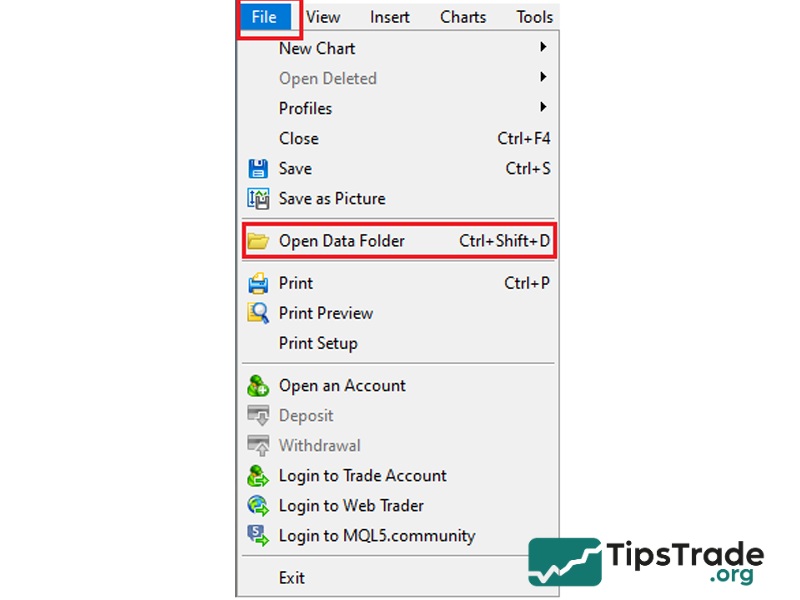
Step 2: In the MT5 control panel, select File => Open Data Folder.
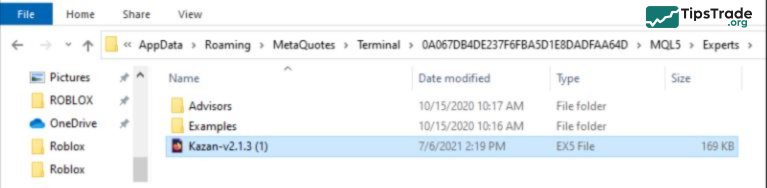
Step 3: In the opened folder, select MQL5 => Experts, then copy the downloaded MT5 Expert Advisor file and paste it into this folder.
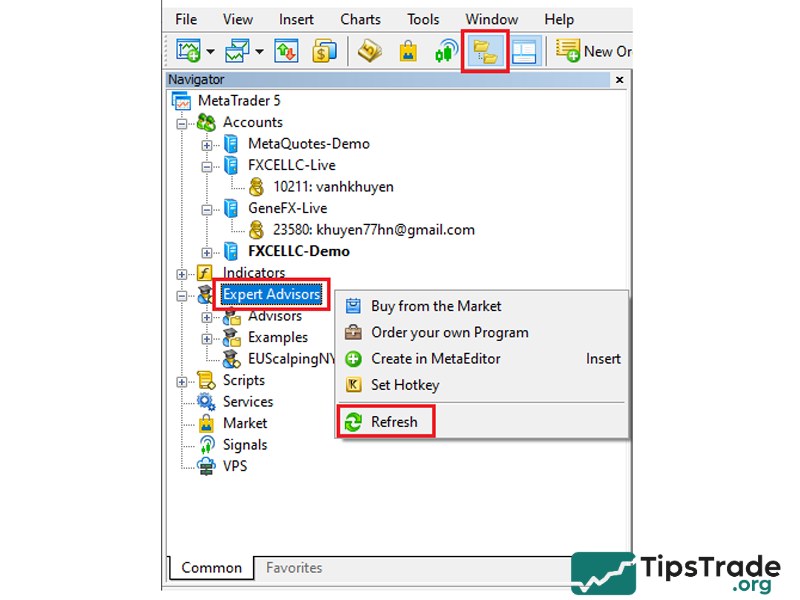
Step 4: On the MT5 control panel, click on Navigator => select Expert Advisors. Right-click and choose Refresh to update the EA list. If done correctly, your EA will appear in the list.
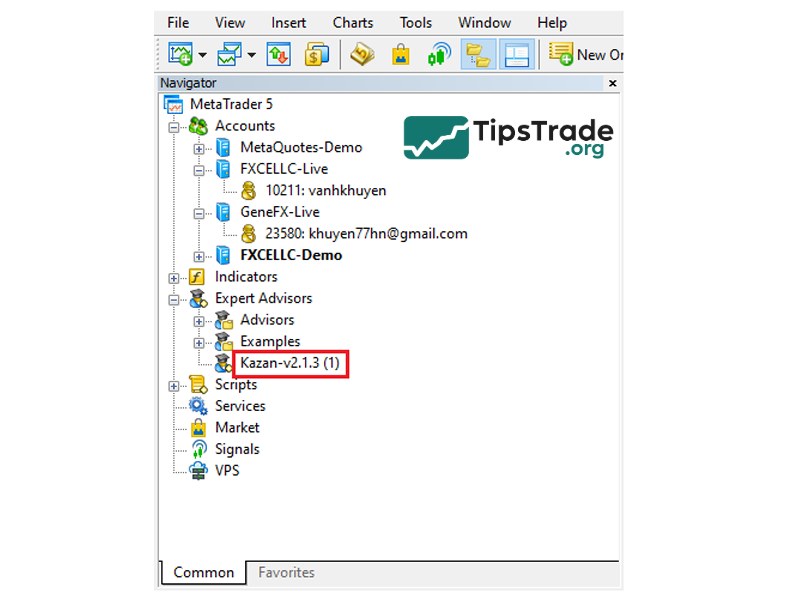
Step 5: Click and hold the left mouse button on the EA and drag it onto the trading chart. Note the following settings:
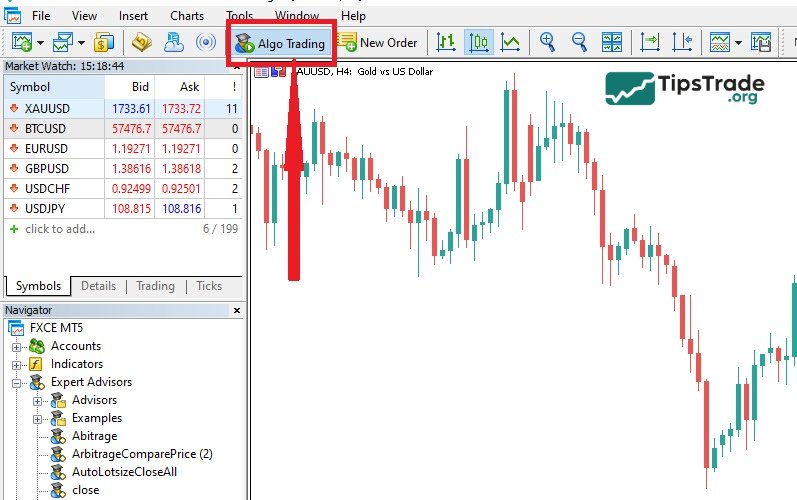
– Select the Algo Trading icon to change it to green.
– In the Common tab, select Allow modification of Signal settings and Allow Algo Trading.
– Click OK to finish.
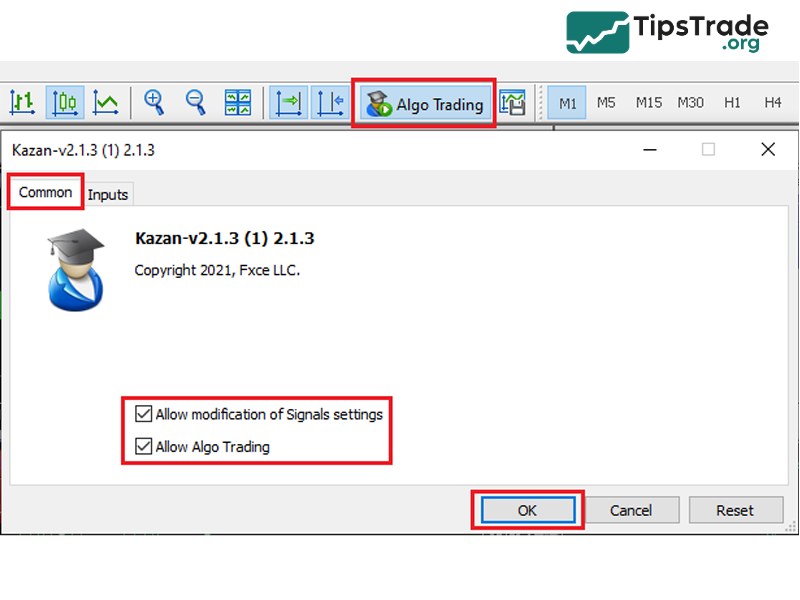
Step 6: After the installation is complete, check the Algo Trading icon on the toolbar. If the icon is displayed in green as shown below, the installation of the MT5 Expert Advisor has been successful.
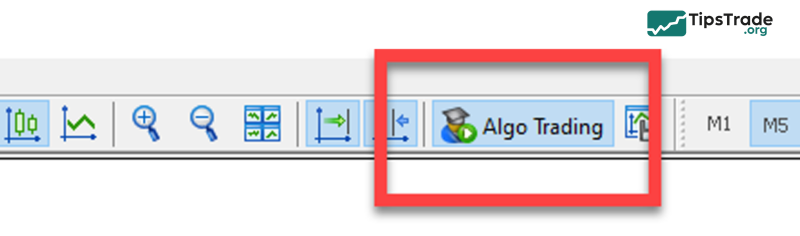
Conversely, when the installation is unsuccessful, the Algo Trading icon will display a “forbidden” sign. This is often due to not selecting Allow Algo Trading. Please check step 5 to complete the process.
How to use MT5 indicators
To apply the indicator on your chart, follow these steps:
- Step 1: Select the currency pair or asset you want to use.
- Step 2: On the toolbar at the top of the platform, select Insert.
- Step 3: Navigate to Indicators. If it is a custom indicator, you can find the icon in the Custom tab.
- Step 4: Select the technical indicator you want to apply.
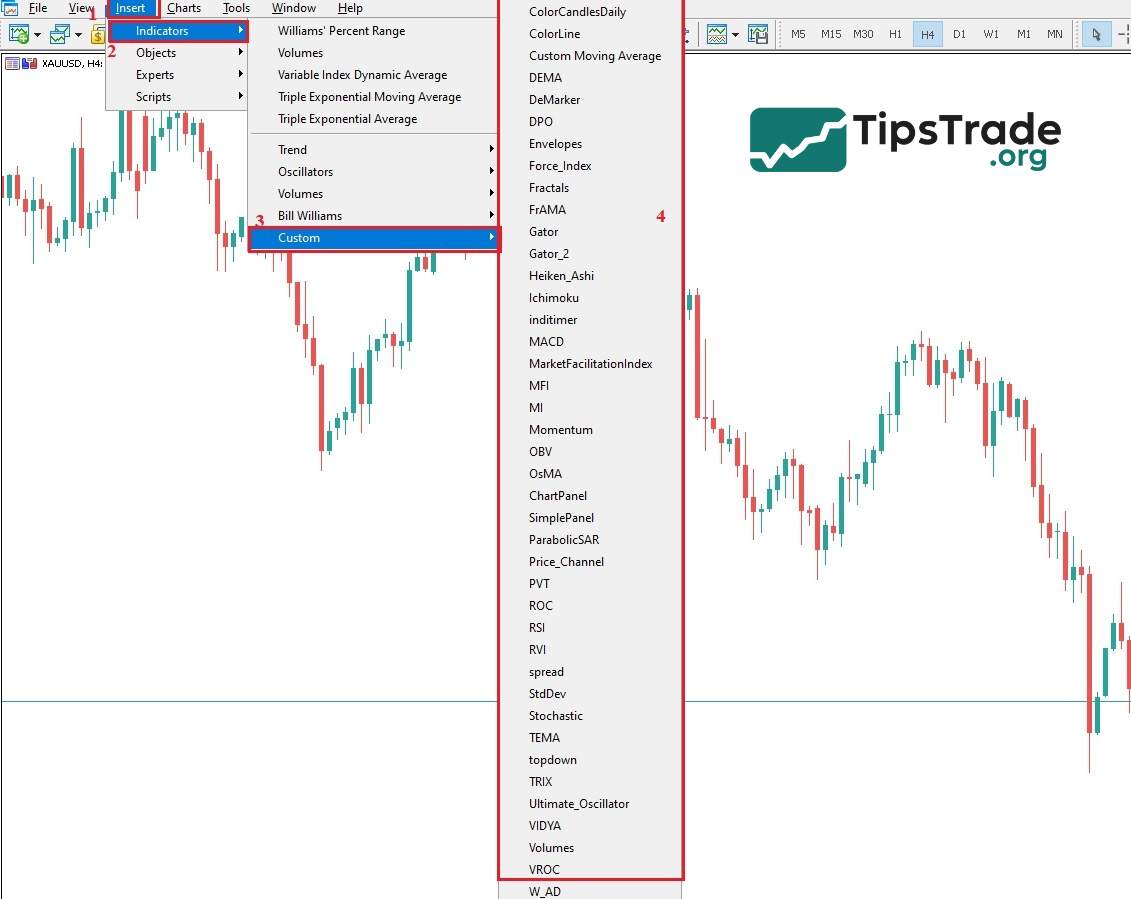
- Step 5: If a popup menu appears to configure options, follow the instructions provided by the indicator creator.
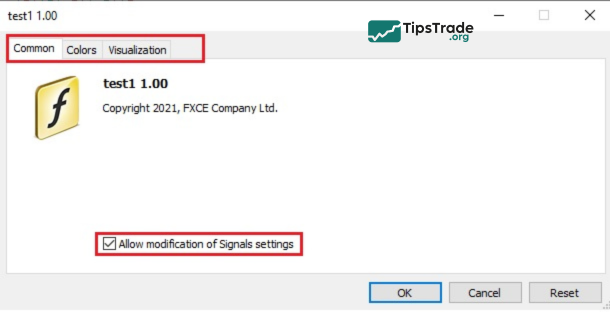
- Step 6: Ensure that the Allow DLL imports option is selected and then click OK. Once completed, the indicator will be displayed on your chart.
How to install an MT5 Expert Advisor
- Step 1: Convert EA files
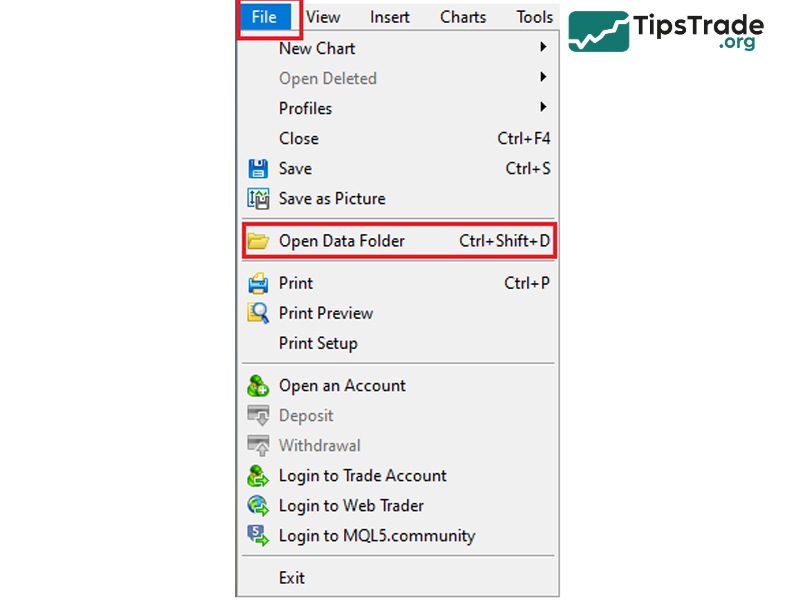
– Save the Expert Advisor (EA) you have developed or downloaded to your computer.
– Select and copy the EA file you intend to install on MT5.
– On MT5, click on the File tab in the top navigation menu, then select Open Data Folder.
– In the MQL5 folder, open the Experts folder and paste the copied EA file there.
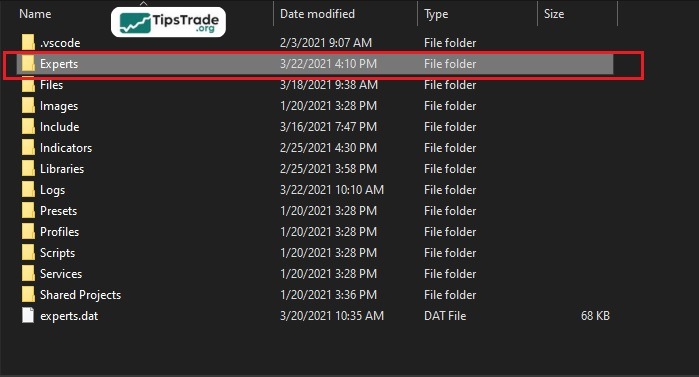
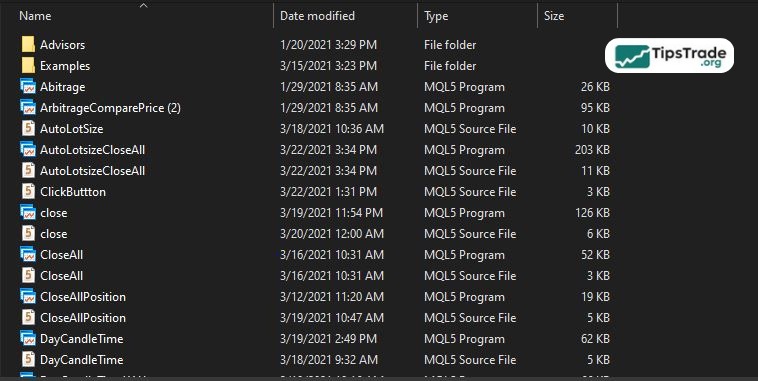
- Step 2: Install EA on the chart
– Refresh the Navigator panel: To ensure the EA is available for installation, refresh the Navigator panel or restart your MT5 platform.
– Find EA: In the Navigator panel on the left side of the platform, locate your Expert Advisor. Click the “+” sign next to Expert Advisors to display the available EAs.
– Drag and drop EA: Drag and drop the EA onto the chart of the currency pair and time frame you want to use.
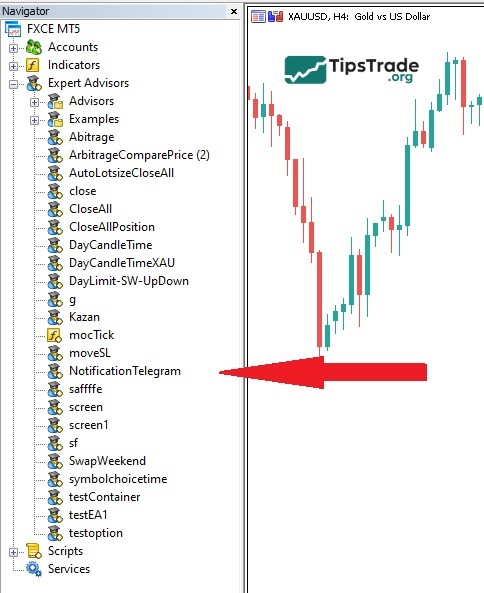
- Step 3: Modify settings
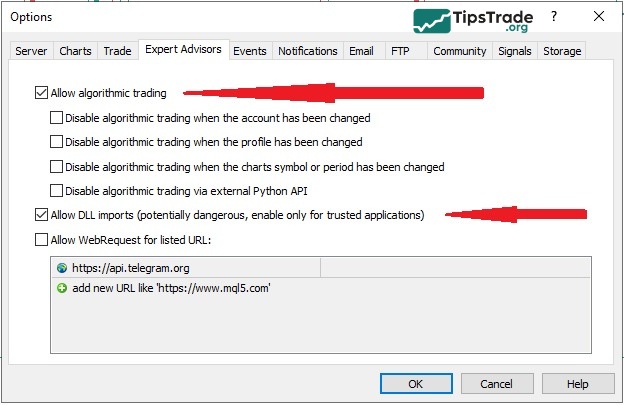
– Open options: In the Tools menu, click on Options.
– Configure EA settings: In the dialog that appears, select the Expert Advisors tab and ensure that the necessary settings are selected, then click OK.
– You should complete this step before attaching the EA to the chart.
Turn on the Algo Trading button at the top of the platform to activate automatic trading. This button will display green when activated.
Confirm EA settings: If a dialog box pops up with EA settings, ensure the necessary options are selected before clicking OK.
- Step 4: Start Trading
– Check the smiley icon: If the setup is successful, you will see a smiley icon in the upper right corner of the MT5 chart. This indicates that the EA is ready to trade.
– Check before trading: Before launching the EA for live trading, you should test it first. This helps assess profitability and make necessary adjustments to optimize performance.
Popular types of MT5 Expert Advisors
Currently, there are 3 most popular MT5 Expert Advisors: Idea Pro Gold, Dragon Scalper Pro, and Top Master EA.
Idea Pro Gold
Idea Pro Gold is an Expert Advisor (EA) developed by Vasily Strukov, a Russian trader. Currently, this product is sold for $45 and has received many positive reviews from traders who have used it. One notable feature of Idea Pro Gold is the dedicated after-sales service provided by Vasily Strukov himself through the Telegram channel.
Usage strategy:
The Peace Indicator is used to identify the current market trend. It helps make trend-following trading decisions (Buy or Sell).
Three trading strategies based on three different indicators:
- Stochastic: A Buy order is executed when the Stochastic indicator is below the oversold threshold. A Sell order is executed when the Stochastic is above the overbought threshold.
- RSI: A similar strategy to Stochastic, a Buy order is executed when the RSI is below the oversold threshold and a Sell order is executed when the RSI is above the overbought threshold.
- MA (Moving Average): A Buy order is executed when the opening price of the candle is above the MA line and a Sell order is executed when the opening price of the candle is below the MA line.
Dragon Scalper Pro
Dragon Scalper Pro is an Expert Advisor (EA) developed by Michela Russo, a trader from Italy. Currently, this product is priced at $390. The EA can be used on a PC or via a VPS service with a maximum latency of 100ms.
Strategy:
Dragon Scalper Pro does not rely on traditional technical indicators or candlestick patterns to determine market trends. Instead, the tool uses price volatility and intelligent algorithms. Although it may seem vague, it has a high return to player (RTP) rate and good resilience against sudden market fluctuations.
This type of EA is recommended for use on major currency pairs such as EUR/USD, GBP/USD, USD/CAD, and NZD/USD. It performs best on the M5 time frame, and the minimum capital required to run this EA is $200.
Top Master EA
Top Master EA is an Expert Advisor (EA) developed by Vsevolod Gorkovts, a Russian. Top Master EA is currently being sold at a competitive price of $349. This EA is recommended for use with the currency pairs EUR/USD and GBP/USD on the M15 time frame and requires a minimum deposit of $50.
Strategy:
Top Master EA does not rely on any lagging technical indicators; it operates entirely based on market momentum and pure price action.
- Recovery strategy: The size of positions will be increased after a losing trade has been closed. This strategy aims to grow the account more effectively.
- Classic strategy: Uses risk management measures to protect the account. This strategy has a low trading ratio but optimizes the average quality of trades.
- Reversal strategy: Based on reversal signals to execute trades. Only use reliable signals and apply multiple techniques to filter out noise signals.
Final thoughts
In summary, MT5 EA not only helps reduce the burden of market analysis and monitoring but also enhances the ability to predict trends and execute orders quickly and accurately. This could be an extremely useful tool that traders should possess. The above are the shares from Tipstrade.org, hoping it will be helpful to you. Wishing you success!