
How to sign up TradingView account? TradingView is one of the most powerful charting and analysis platforms for traders and investors. With a user-friendly interface, a wide range of technical analysis tools, and the ability to integrate data from multiple exchanges, TradingView has become a top choice for the global trading community. To use this platform, you need to have an account. In this article, Tipstrade.org will provide the most detailed guide on how to sign up TradingView account for beginners, helping you easily create an account in just a few minutes with a few simple steps.
Top benefits of signing up for a TradingView account
Creating a TradingView account gives traders the following notable benefits:
- Access to advanced charts: TradingView allows users to create advanced charts with customizable technical indicators and drawing tools.
- Smart filters: Supports intelligent filtering to identify trading opportunities based on specific technical or fundamental criteria.
- Real-time market data: Provides real-time data for a wide range of assets, including stocks, forex, and commodities.
- Social networking features: Users can share trading ideas, strategies, and charts, while also learning from the community.
- Alerts: Supports customizable alerts for price movements and market events.
- Multi-platform compatibility: Accessible via web browsers, smartphones, and tablets.
- User-friendly interface: Designed with a modern, intuitive layout suitable for both beginners and professional traders.
- Multi-language support: TradingView currently supports multiple languages.
See more:
- Explore top 5 best indicators TradingView
- Guide to using TradingView chart for beginners
- TradingView vs MT4 in 2026: Which Platform Is Right for You?
- TradingView vs MT5: Which Platform is Best for Your Trading Strategy?
Things to consider before signing up for a TradingView account
Below, Tipstrade.org will summarize things you should consider before signing up for a TradingView account.
Purpose of use
Are you signing up for TradingView for casual market tracking, advanced technical analysis, or automated trading? The platform caters to different levels of traders, so understanding your needs will help you choose the right plan.
Subscription plans
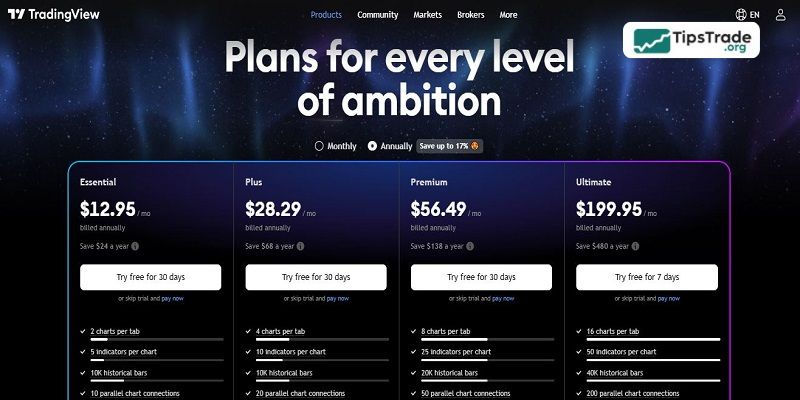
TradingView platform offers different plans:
- Free Plan: Limited access to indicators and charts, suitable for beginners.
- Pro & Pro+: More charting capabilities, ad-free experience, and enhanced features.
- Premium: Unlimited indicators, alerts, and advanced functionalities for serious traders. Reviewing the features of each plan beforehand will help you determine if a free account suffices or if upgrading is necessary.
Market data access
While TradingView provides real-time data for many markets, some exchanges (e.g., NASDAQ, NYSE, CME) require a paid data subscription. If you need real-time quotes, you may need to subscribe to additional data feeds.
Broker integration
If you plan to trade directly from TradingView, check if your broker is supported. Many popular brokers offer direct integration, allowing seamless execution of trades through the platform.
Community & social features
TradingView has a strong community where traders share ideas, strategies, and market insights. If you’re looking to learn from others, following experienced traders and engaging in discussions can be highly beneficial.
Step-by-step guide to sign up TradingView account
- Visit the TradingView website: Go to TradingView and click on the Sign Up button in the top right corner.
- Choose a registration method: You can sign up using Email, Google account, Apple ID, Facebook. Choose the method that best suits you and proceed.

- Enter your details:
- If using an email, enter your email address, username, and password.
- Agree to TradingView’s terms of service and privacy policy.
- Click Sign Up.
- Verify your email: Check your inbox for a verification email from TradingView. Click on the link to activate your account.
- Customize your profile:
- Set up your profile with a picture and bio.
- Select your market preferences (Forex, Stocks, Crypto, Futures, etc.).
- Follow top traders and join discussions.
- Explore the features:
-
- Access free charts and indicators.
- Try different timeframes and analysis tools.
- Set up watchlists and alerts.
- Consider upgrading (Optional): If you need additional features, visit the Pricing Page and upgrade to a paid plan.
Challenges in using a TradingView account
- Limited broker integration: Not all brokers are supported on TradingView.
- Steep learning curve: New users may find it overwhelming to navigate as TradingView is feature-heavy.
- Limited offline accessibility: TradingView is primarily an online platform. This limits access to its features and data without an internet connection.
Notes when signing up for a TradingView account
✅ Use your primary email address to ensure you don’t lose access to your account.
✅ Do not share your password with others to protect your account.
✅ Start with a free account to get familiar with the platform before upgrading.
✅ Regularly update your personal information to optimize your user experie.
Conclusion
Hopefully, with the detailed information shared in this article, investors have gained a better understanding of how to sign up TradingView account. From this, the full potential of this trading platform can be maximized. Let’s start exploring and using TradingView today to improve the effectiveness of your analysis and trading. Wishing you successful investments!
See more: