

TradingView stocks is one of the most popular tools for investors to monitor, analyze stocks, and make effective trading decisions. With its intuitive and user-friendly interface, TradingView is suitable for everyone from beginners to seasoned investors. This article will guide you step by step on how to use TradingView stocks to identify precise entry points in a detailed and professional manner.
Overview of TradingView platform
TradingView is a financial analysis platform owned by TradingView Inc., founded in 2011. It provides online charts and technical analysis tools for the global gold, stock, cryptocurrency, forex, and commodities markets. TradingView is designed for traders to connect, share ideas, analyze markets, and make accurate investment decisions.
See more:
- How to Download MT5 Easily on Different Devices
- How to Use TradingView Mobile App for Beginners 2026
- How to Sign Up TradingView Account? Step-by-Step Guide
- Top Powerful TradingView Features Every Trader Should Know
Why is TradingView the “King” of stock charts?
Unlike Forex (a decentralized market), stocks require investors to pay attention to both price data and company fundamentals. TradingView excels at integrating these two elements:
- Financial report data on charts: Investors can see Earnings dates (E), Dividends (D), and Stock Splits (S) displayed directly beneath each candlestick.
- Benefit: This helps investors avoid shorting right before a dividend date or buying just ahead of negative earnings news.
- Stock Screener: A powerful tool that allows investors to narrow down the top 10 potential stocks from over 10,000 symbols in just one minute (for example, filtering stocks with P/E < 15 and RSI < 30).
- Real-time data: Supports live data from major exchanges such as NYSE, NASDAQ, and HOSE (Vietnam).

The process for identifying entry points with TradingView stocks
To turn TradingView into a professional stock charting machine, follow these steps:
Step 1 – Create a TradingView account: You can sign up for a free account; however, the free version has certain limitations on the number of indicators and alerts. To unlock full features and enjoy the best experience, you may consider upgrading to a paid TradingView plan.

Step 2 – Set up a Watchlist: To optimize stock monitoring and management, you should create a watchlist of the stocks you are most interested in. Simply add ticker symbols to your watchlist to quickly stay updated on daily price movements, news, and key technical signals.

Step 3 – Use advanced technical analysis tools: TradingView offers a wide range of powerful technical indicators, including:
- RSI (Relative Strength Index): Helps identify overbought and oversold zones for timely trading decisions.
- MACD (Moving Average Convergence Divergence): Provides trading signals based on the convergence and divergence of moving averages, making it easier to pinpoint buy and sell timing.
- EMA / SMA (Exponential / Simple Moving Average): Clearly highlights short-term and long-term price trends.
- Bollinger Bands: A useful indicator for identifying periods of high volatility and potential breakout zones.
Step 4 – Set price and technical alerts: TradingView allows you to create alerts based on stock prices or technical indicator signals. You can easily configure notifications via email, SMS, or in-app alerts, helping you stay proactive and never miss an investment opportunity in the market.
Strategy for finding entry points with TradingView stocks accurately
- Identify the overall trend: Use EMA 50 and EMA 200 to determine the stock’s medium- and long-term trend. When the EMA 50 crosses above the EMA 200, it is commonly viewed as a bullish signal, and vice versa.
- Entry signals: Combine the RSI and MACD indicators to make buy or sell decisions. For example, when RSI falls below 30 and the MACD crosses upward, this is considered a strong buy signal. Conversely, an RSI above 70 combined with a downward MACD crossover indicates a potential sell opportunity.
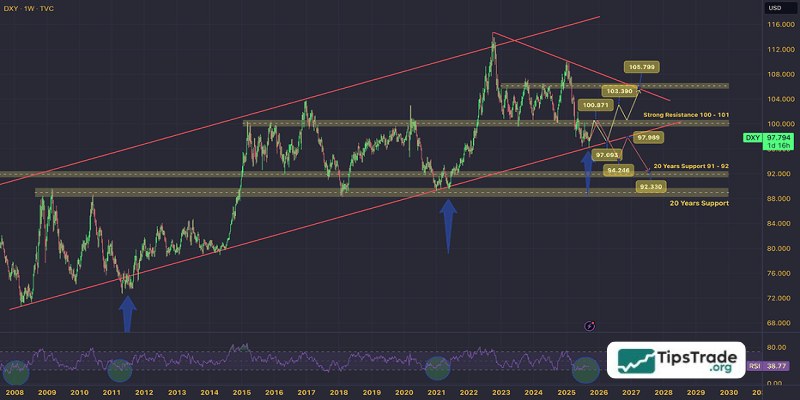
Important considerations when finding entry points with TradingView stocks
- Always combine technical analysis with fundamental analysis to gain a comprehensive view of a stock.
- Avoid using too many technical indicators at the same time, as this can create information overload and reduce accuracy.
- Continuously update your knowledge and learn from experienced traders through articles, forums, or shared ideas on TradingView.
- Practice analyzing the market on a demo account or observe price movements for a period of time before investing real money.
Conclusion
TradingView stocks is a powerful and indispensable tool for professional stock analysis. With the comprehensive A-to-Z guide above, we hope you now have a clear understanding of how to use TradingView stocks to identify effective entry points and apply these techniques in real-world investing. Practice regularly and continuously refine your analytical skills to achieve long-term success in the stock market!
See more: