
The Forex Factory interface is built on a minimalist philosophy but focuses on maximizing user experience, helping traders access market data quickly and accurately. Let’s explore the Forex Factory interface with Tipstrade.org in the article content below!
Introduction to forex factory
Forex Factory was founded and is operated by Fair Economy, Inc., a company specializing in financial information services, with the aim of creating a dedicated forum for foreign exchange traders.
- How to Use Forex Factory for Maximum Success
- What is MT4? A detailed guide on how to download and use MT4
- MT5 (MetaTrader 5) Forex Trading Guide from A-Z
- Top Powerful TradingView Features Every Trader Should Know

Currently, the Fair Economy ecosystem consists of four main components:
- ForexFactory® focuses on the foreign exchange markets and is among the twenty most-visited financial websites in the world.
- Crypto Craft® covers cryptocurrency markets and is the first cryptocurrency website built on core market principles.
- Energy EXCH™ specializes in energy markets and provides a unique economic calendar designed specifically for energy traders.
- Metal Mine™ covers metal markets and serves as one of the few freely accessible resources offering real-time spot prices.
Overview of the forex factory interface
The ForexFactory interface is extremely user-friendly, focusing on the needs of traders. They can access any content they want in the fastest possible way.
Not only that, but ForexFactory also allows users to customize their homepage flexibly.
You can personalize the content you want to see first on the homepage each time you visit ForexFactory.
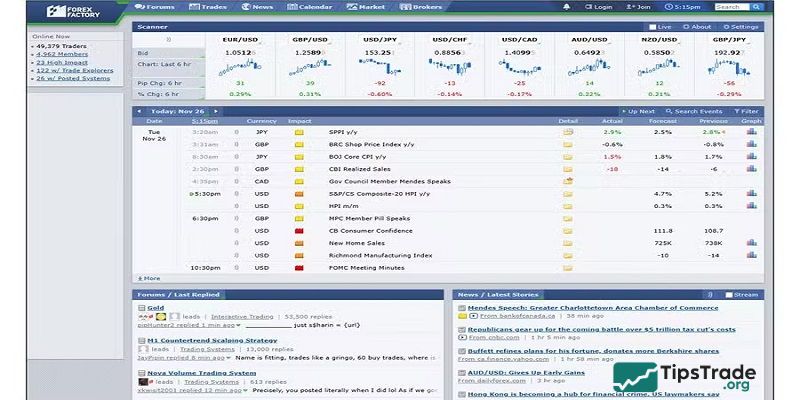
Forex Factory Toolbar
The top toolbar of Forex Factory includes several components:
- Button to switch between websites
- Key feature areas
- Account registration/login button
- Time zone setting area

Forex Factory Homepage Options
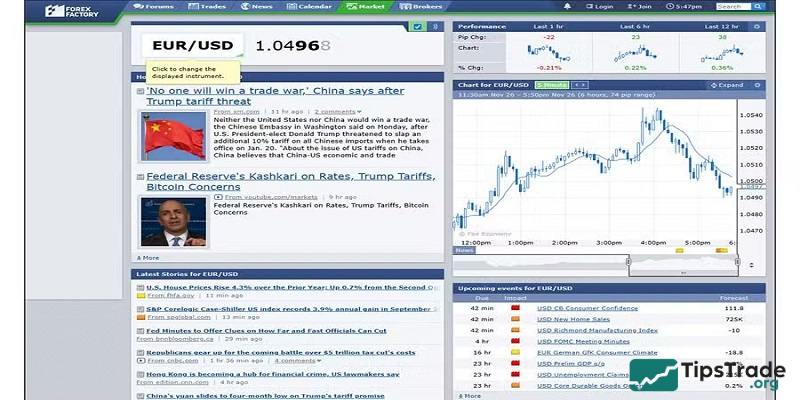
Right on the homepage, Forex Factory allows you to quickly switch between 1 of 4 website addresses including ForexFactory, Metals Mine, Energy EXCH, and Crypto Craft with just one click.
Depending on your needs, whether it’s the Forex market, the Crypto market, energy, or precious metals, Forex Factory presents everything very visually.

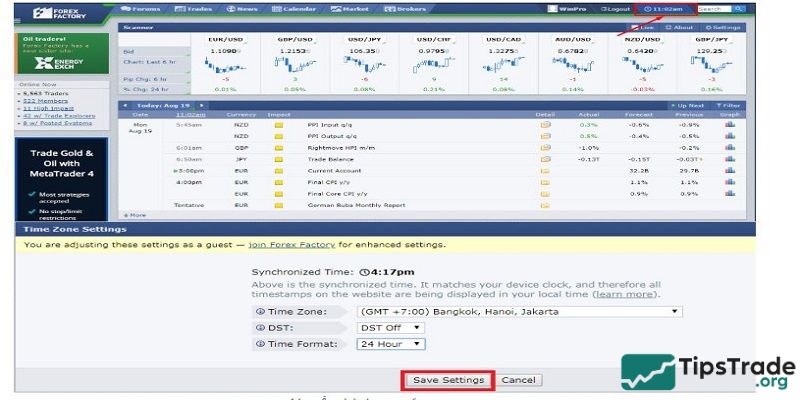
Set the time zone
From the Forex Factory homepage, you only need one click to go to the time settings area and select the time zone you want.
Forex Factory can be adjusted to any time zone. Once you have correctly synchronized your time, all time values across the website will be displayed in the local time you have selected.
Customizing the Forex Factory homepage
Upon accessing the website, you will see that the ForexFactory homepage contains a wide range of information sources, clearly organized into separate blocks.
What makes ForexFactory unique is that it allows users to freely customize the display area of each block by moving them up or down, left or right (depending on the block). Essentially, the ForexFactory homepage functions as a blank framework where you can add or arrange displayed content according to your preferences.
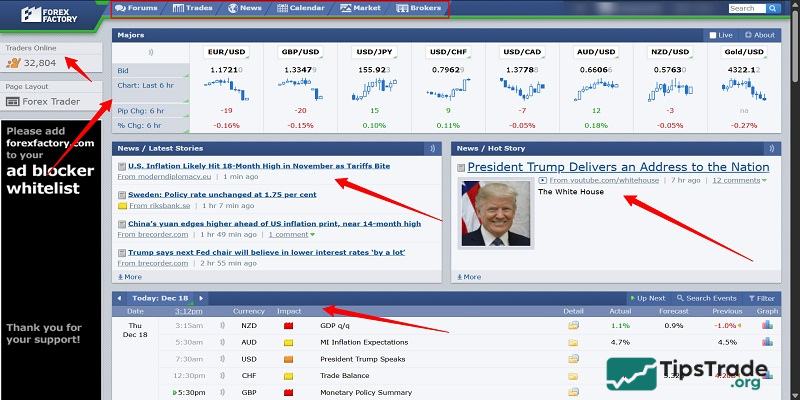
If you are only interested in the Economic Calendar, you can remove all other blocks from your homepage view and add only the information blocks you want.
If you wish to restore the homepage to ForexFactory’s default layout, simply click the Default Page button located at the bottom of the homepage.
When you log in as a ForexFactory member, your selected time zone will be synchronized and saved. On subsequent visits, the website will continue to display the correct time zone you have chosen.
Note: ForexFactory’s default time zone is New York time, which is either EST (GMT -5) or EDT (GMT -4), depending on the time of year. When you log out and your cookies are cleared, the website will revert to displaying this default time zone.
Detailed analysis of key sections in the forex factory interface
As soon as you access the Forex Factory homepage, you will immediately see the main functional sections displayed at the top of the page, including:
- Forum – the ForexFactory discussion forum
- Trades – the trading section
- News – the news section
- Calendar – the ForexFactory economic calendar
- Market – the markets section
- Brokers – broker platforms featured by ForexFactory

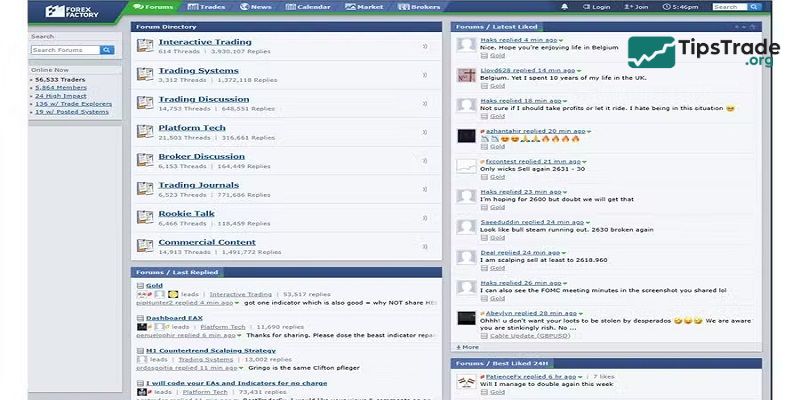
Forex Factory Forums
The Forex Factory forum is one of the most actively engaged communities in the global financial world. With an enormous number of topics and in-depth discussions, the Forex Factory forum is a place where you can find almost any knowledge you are looking for.
Similar to the homepage interface, the Forex Factory forum is also divided into multiple content blocks displayed across different sections, including:
- Forum categories
- Latest replies
- Hottest topics
- Most recently liked posts
- Most liked posts within the last 24 hours
- Latest replies from other forums
Except for the forum categories, the remaining blocks can be added to the homepage. You can also easily arrange and customize the Forum page layout in the same way as you do on the Forex Factory homepage.
Trade explorer
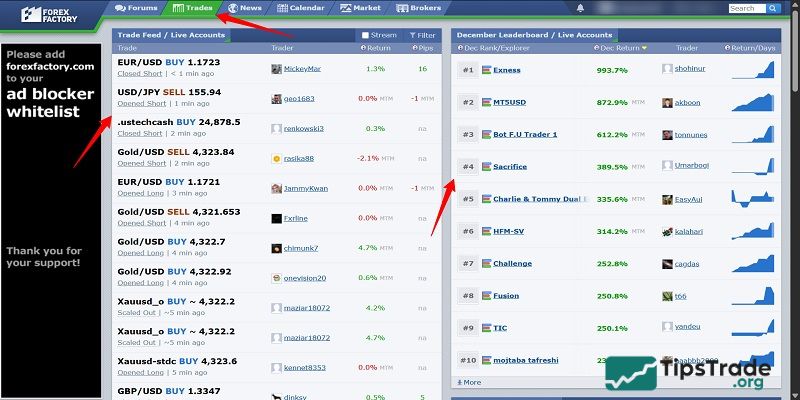
This area consists of 3 main parts:
- Trade Feed
- Account rankings by % profit
- Currency pair positions
#Trade Feed
Trade Feed is a unique Forex Factory application that reflects users’ real-time trading activity.
These are trades executed by Forex Factory members who have chosen to make their accounts public.
If you have a trading account but do not want it to appear on Trade Feed, you can select private mode, in which only you can view your own trading information.
#Account rankings by profit percentage
This section displays a leaderboard of member accounts with the highest profitability.
You can filter the rankings by week, month, or year, for both demo and live accounts.
Accounts set to private by members and accounts with equity below 100 (currency units) will not be shown on this leaderboard.
#Currency pair positions
This area displays the positioning of eight currency pairs, including the seven major pairs and GBPJPY.
The correlation of currency pairs can be displayed based on:
- Traders
- Trading volume
- Both
For example, for the EURUSD pair, there are currently:
- Trader-based positioning: 358 long traders (64%) and 203 short traders (36%).
- Volume-based positioning: 319 lots long (88%) and 41.5 lots short (12%).
If you want more detailed information, you can click the folder icon to open an expanded view. Here, Forex Factory provides additional data such as:
- Average entry price
- Average profit
- Average trade duration
- Number of winning trades and losing trades
In addition, there is an overview chart showing the long-to-short ratio based on either the number of traders or the number of lots, as well as a table displaying the traders participating in EURUSD trades.
News feed
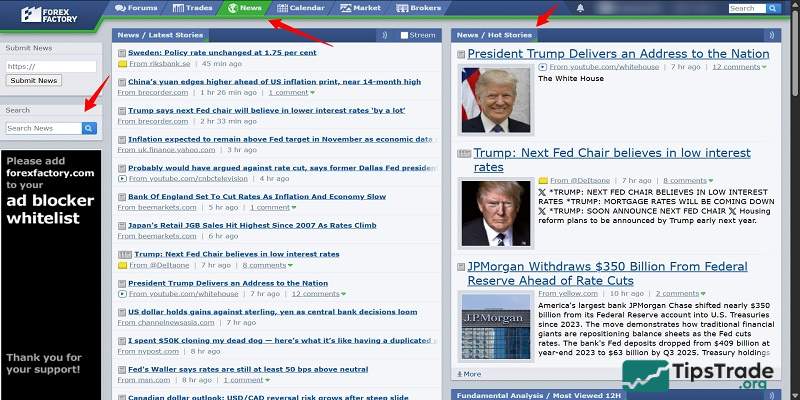
Forex Factory consistently delivers news with exceptional speed and accuracy.
The Forex Factory News team, made up of experienced editors, ensures the quality and timeliness of news content for users.
Similar to the homepage, the Forex Factory News page allows you to customize the display to suit your preferences, enabling you to arrange information blocks in any layout you choose.
In addition, you can select the amount of information displayed within each block.
Forex Factory Calendar
Below are the guidelines to help you use the Forex Factory Economic Calendar effectively.
#Main interface of the Economic Calendar
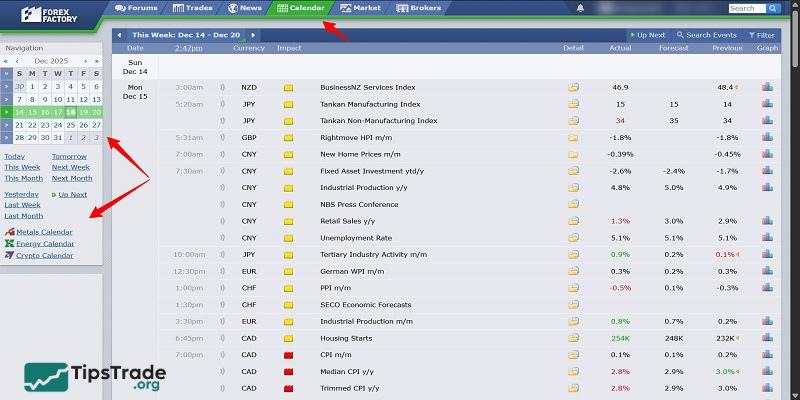
The interface consists of two components:
- Sidebar: Includes time display settings for news events and a navigation menu for switching between economic calendars related to metals and energy.
- News table: Displays all news events along with detailed parameters such as the exact date and time, currency, news impact level (indicated by color), data source, event figures, and charts.
#Sidebar
This is the option panel that allows you to select the time period for the news you want to view.
You can view news for a specific day, week, or month, and even customize the display for any custom time range.
This section also includes annotations provided by Forex Factory, file export features, and central bank exchange rates for different currencies.
#News table
If you are a professional trader who uses paid services to receive news updates from major providers such as Bloomberg or CNBC, there is little to debate.
However, if you are a retail trader or simply want to follow market developments, Forex Factory is the best choice and it is completely free.
Forex Factory allows users to customize their view using flexible filters.
This feature enables you to filter news based on the parameters you care about, including currency, event type, and impact level, which is color-coded (with red indicating the highest impact).
If you are only interested in currencies such as the US Dollar, Japanese Yen, or British Pound, you can exclude all other currencies.
You can also remove low-impact news marked in gray and yellow, focusing only on high-impact events highlighted in orange and red, as these are more likely to affect your trades.
In addition to tracking event timing and data figures, Forex Factory provides more detailed information for each news event by clicking the folder icon next to the event.
This tab displays previous results, how the event is measured, why it matters, and more. It even includes links to related articles on the specific topic.
Market Data and Charts
There are 3 main components of the market.
- Scanner
- Chart
- Market session
All data for these three sections is compiled in real-time from various sources by ForexFactory’s Market Data Application.
#Forex currency pairs available on Forex Factory
Forex Factory provides 28 forex currency pairs with exchange rates updated in real time, 24 hours a day.
The data is aggregated from multiple sources to ensure transparency and integrity. The exchange rates offered by Forex Factory closely resemble those of a real trading venue and are more reliable than any over-the-counter (OTC) data feeds.
| AUD / CAD | CAD / JPY | EUR / AUD | GBP / AUD | NZD / JPY | USD / CAD |
| AUD / CHF | CHF / JPY | EUR / CAD | GBP / CAD | NZD / USD | USD / CHF |
| AUD / JPY | EUR / CHF | GBP / CHF | USD / HKD | ||
| AUD / NZD | EUR / GBP | GBP / JPY | USD / JPY | ||
| AUD / USD | EUR / JPY | GBP / NZD | USD / MXN | ||
| EUR / NZD | GBP / USD | USD / SGD | |||
| EUR / USD |
#The data source used by Forex Factory
Exchange rates for currency pairs are compiled by Forex Factory from the following 15 brokers:
| XM.com | Tickmill | OANDA | BDSwiss |
| FOREX.com | FP Markets | HotForex | OctaFX |
| FxPro | FXTM | LiteForex | Trading.com |
| ACY Securities | Pepperstone | ActivTrades |
#Scanner
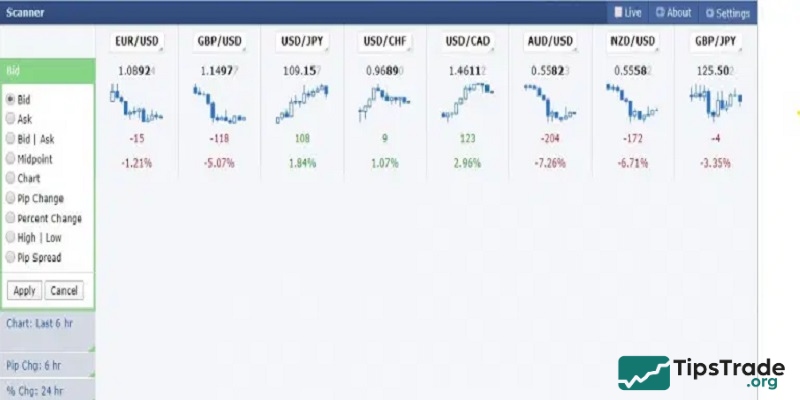
This is a visual tool that helps traders quickly gain an overall view of current market movements.
In the settings section, Forex Factory allows you to customize the block name, number of rows, number of columns, and choose whether to display point values in exchange rates.
The scanner can display up to 8 rows and 8 columns. Within each row, you can choose to display parameters such as:
- Bid/Ask prices
- Mini charts across different timeframes, displayed as candlestick, bar, or line charts
- Pip changes across different timeframes
- Percentage price changes across different timeframes
- Spread
- ……
Each column represents a forex currency pair, corresponding to the parameters selected for each row.
#Market charts
Forex Factory’s charts offer a wide range of options and settings, allowing you to customize the display to suit your preferences. On the chart toolbar, you can:
- Choose the currency pair you want.
- Timeframe selection: Forex Factory offers 10 timeframes from M1 to Monthly.
- Tools for drawing basic curves.
- Support indicators such as displaying when news is synchronized with the chart, displaying trading sessions, etc.
- LIVE option: When you select Live, the chart will be displayed in real-time instead of you having to reload the website to update the new prices.
- Settings: Here you can choose the time frame, chart size, chart type, time period, colors for the chart, etc.
#Sessions
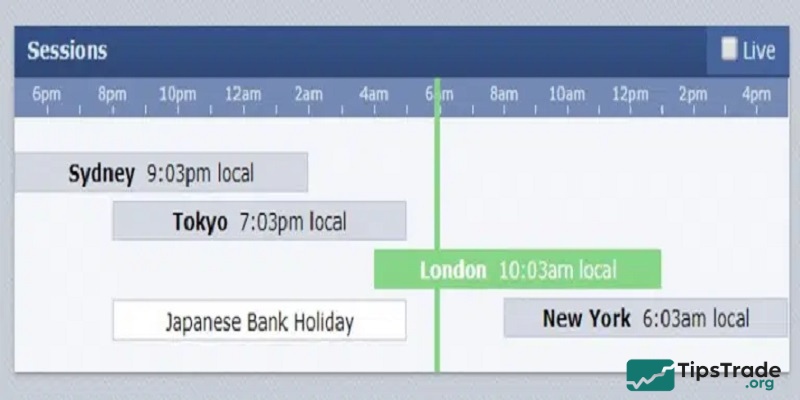
This is a very interesting feature of the Forex Factory. With Sessions, you can easily identify which trading session the market is currently in, as well as when each session starts and ends.
- A blue session indicates the currently active session. The blue line represents the current market time. Each marker corresponds to one hour (there are 24 markers on the timeline).
- When you hover your cursor over a session, information will be displayed showing the start time of the next session (for sessions that have already ended) and the end time of the current session.
The sessions are defined as Sydney, Tokyo, London, and New York, along with their respective start and end times, based on OANDA’s FXMarketHours tool.
Please note that session times shift by one hour in spring and fall due to daylight saving time.
Broker Directory
This section lists the brokers featured by Forex Factory.
All brokers listed on Forex Factory are required to meet certain criteria set by the platform, including being regulated by reputable authorities, having no history of fraud, and undergoing regular audits. Some of these regulatory bodies are partially listed at the top of the “Company” column.
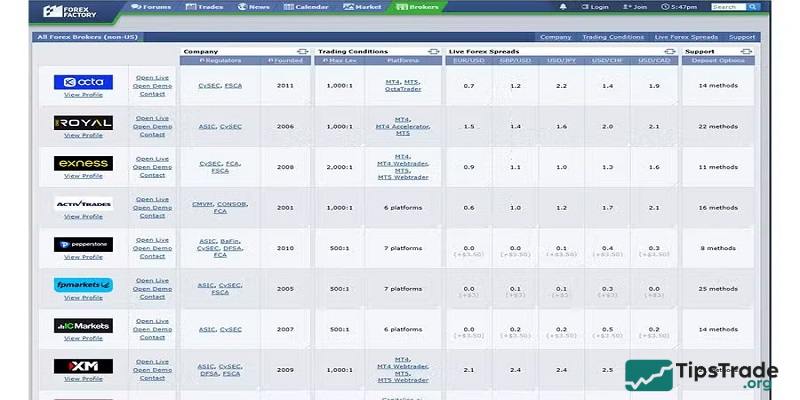
Forex Factory clearly states that only brokers regulated by recognized authorities such as the CFTC or NFA are allowed to advertise on their website.
However, it is important to note that brokers listed on Forex Factory pay fees to the company, meaning this is a form of paid advertising. Therefore, a broker’s presence on Forex Factory does not necessarily indicate that it is a high-quality broker.
Choosing a broker is a decision that should be carefully considered, as not every broker on the list will truly be suitable or reliable for your needs.
Conclusion
So, that concludes the article introducing the Forex Factory interface. We hope that you now have a clear understanding of the Forex Factory homepage interface that Tipstrade.org has introduced. Wishing you effective and successful trading!
See more: